


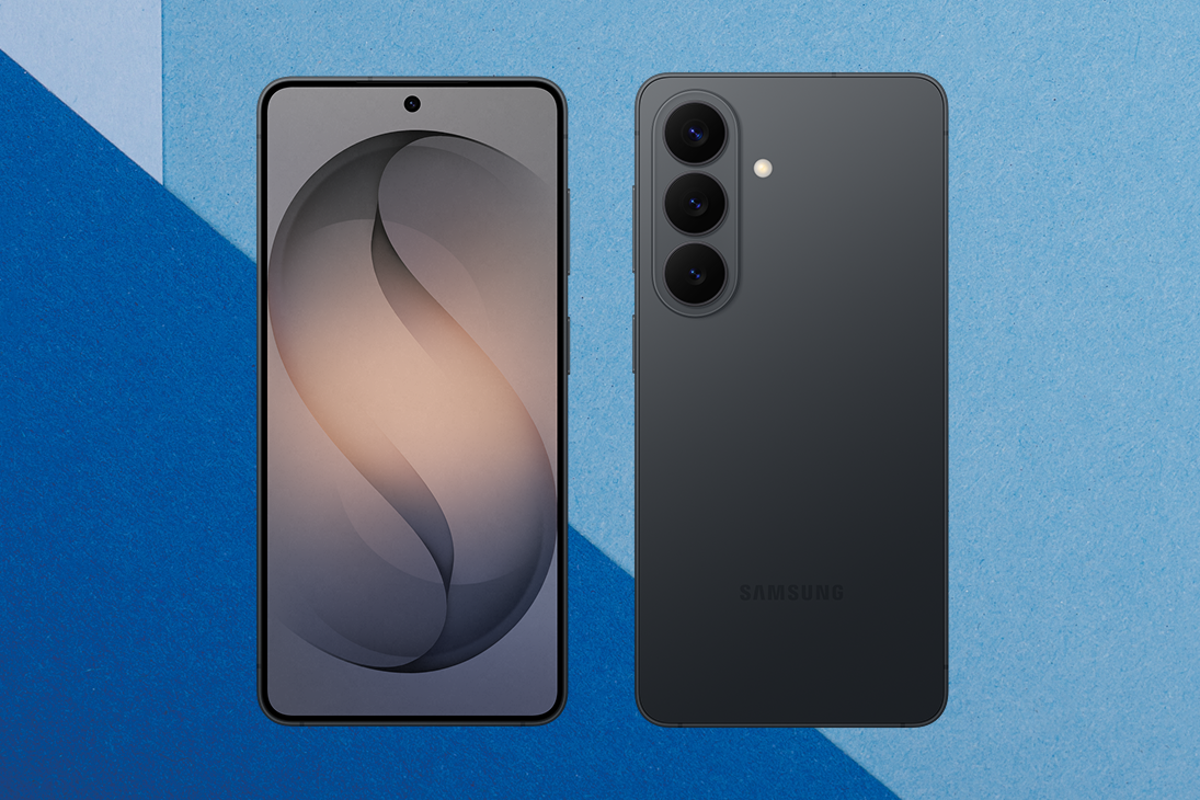
I can’t remember the last time a new phone actually wowed me. The ritual of unboxing a shiny new handset has felt so samey over the past few years that I’d started to think I’d lost the excitement for good. Launch after launch, one smartphone has blurred into the next. But then I got my hands on the Samsung Galaxy S26 Ultra, and oh, did that boyhood wonder return.
The Samsung Galaxy S26 Series line-up is stuffed to the brim with Galaxy AI* features that make owning a smartphone feel less like a chore again. Artificial intelligence is woven so deeply into the software that it often feels as though it’s anticipating what you want, rather than waiting to be prompted.
I’ve been testing the Samsung Galaxy S26 Ultra since it was first announced, and it’s one of the most enjoyable phones I’ve used in a long time. From the neat Privacy Display** that stops nosey people reading your notifications to clever generative editing tools and agentic AI, I’m absolutely loving the Samsung Galaxy S26 Ultra. These are the six features that have impressed me most.
1. Samsung Galaxy S26 Ultra Privacy Display – for shoulder-surfing protection
One of the headline features on the Samsung Galaxy S26 Ultra is the Privacy Display**, and it’s one of the coolest things I’ve seen on a smartphone in a long while. I hate being on the tube, avoiding opening dating apps for fear the person next to me is getting a front-row seat to my cringe texts.
Privacy display** is available directly from the quick settings. The phone looks completely normal when viewed straight on, but if you tilt it even slightly, whatever’s on screen fades to black making it completely unreadable by nosey shoulder surfers.
It works at a pixel level, and you can apply it to certain parts of the display, including notifications and the PIN entry. You can toggle the feature to maximum if you want full privacy. The brightness does dim slightly when it’s turned on, and it won’t stop someone directly behind you from peering over your shoulder, but no one next to you or in front of you will be able to read what you’re doing.
2. Samsung Galaxy S26 Document Scanner – turns photos into clean scans
I live in a flat with some really harsh overhead lighting. It makes taking photos of documents really difficult because shadows of my head and my hand hovering over pieces of paper get in the way whenever I’m taking a snap – no matter where I stand.
The Samsung Galaxy S26 Series’ Document Scanner feature removes that annoyance. It automatically detects the edges, straightens the perspective and removes shadows. It can even remove your fingers if you’re holding the page down, as well as smooth out creases. It actually makes it look like I’ve scanned files using a proper optical scanner, rather than my phone.
3. Samsung Galaxy S26 Audio Eraser – improves dialogue in videos and streaming apps
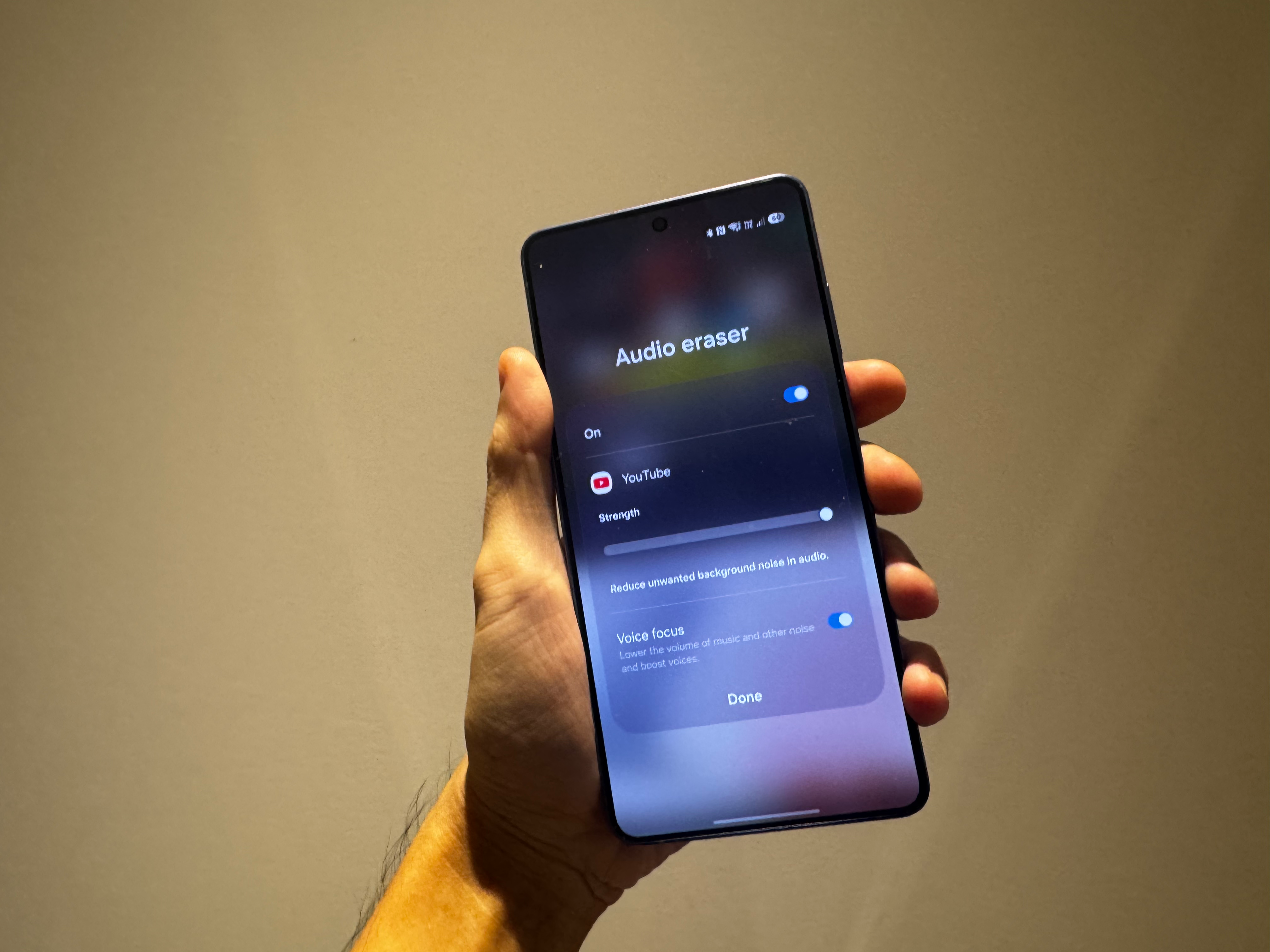
If you’re anything like me and absolutely loathe the direction some films are moving in when it comes to sound design, the Samsung Galaxy S26 Series’ updated Audio Eraser*** feature is absolutely gamechanging. While Audio Eraser could already reduce certain background noises in your own recordings, it now works in third-party video and streaming apps, just by pulling down the quick settings menu.
I re-watched Christopher Nolan’s Tenet on my Samsung Galaxy S26 Ultra and turned on Voice Focus in the Audio Eraser*** settings. What this did was lower the volume of music and background sound effects while boosting dialogue. For once, I could actually hear what Robert Pattinson was saying, though some things are still beyond even Samsung’s Galaxy AI* – I still couldn’t make out what Bill Murray whispered in Scarlett Johansson’s ear at the end of Lost in Translation (yes, I tried).
It also did a brilliant job reducing wind noise in those dramatic YouTube videos of planes trying to land in heavy storms.
4. Samsung Galaxy S26 Photo Assist – brings generative AI photo editing to everyone
You don’t need to be a Photoshop whiz to tidy up your photos anymore. Samsung’s upgraded Photo Assist† feature lets you edit images simply by describing what you want in your own words – using voice or simple text prompts. You can even select an object from another image and ask Photo Assist† to place it into your shot. It can darken or lighten skies, and there are loads of preset Styles to choose from if you’d rather tweak your photo without typing out a prompt.
I asked it to clean up the mess on a restaurant dining table in a group birthday shot and put some lit candles on a birthday cake in post-production (I’d left them at home). It did both quickly, without me having to re-prompt it several times.
When I was listing clothes on an online marketplace app, I got Photo Assist to remove clutter from the background and add a cleaner backdrop, making it look way more professional than if I’d just uploaded the picture from my bedroom.
5. Samsung Galaxy S26 AI Call Screening – Stops spam calls automatically
While some smartphones have had AI call screening‡ for a while, I really like how Samsung have implemented this feature on the Galaxy S26 Series. If you receive an inordinate number of spam calls, you’ll absolutely love this one.
When it’s turned on and an unknown number rings up, Samsung picks up the call on your behalf, with a virtual voice assistant asking who it is and why they’re calling. You get their response in text form right on your screen, and you can even respond back by text, with the phone reading aloud what you write. No need to pick up at all.
6. Samsung Galaxy S26 Agentic AI
The Samsung Galaxy S26 Series can carry out multiple actions in one go thanks to an upgraded AI-powered Bixby§. I asked Bixby§ to find highly rated restaurants for my trip to Barcelona next week and text them to my friend Adam. It pulled up well-reviewed spots, compiled them into a single message and drafted it in my texts, ready to send. It won’t send anything without your say-so, but you can hit confirm whenever you like.

Conclusion: Is the Samsung Galaxy S26 Ultra worth buying right now?
The Samsung Galaxy S26 Ultra doesn’t just add AI features for the sake of it – it actually makes life easier, whether that’s screening nuisance calls, fixing a photo in seconds or helping you hear films and TV shows better. None of it feels gimmicky either. It’s very literally embedded into the phone’s OneUI 8.5 software, so it never feels like a bolt-on. For the first time in years, a new smartphone has actually felt fun to use again.
Samsung Galaxy S26 Ultra FAQs
What are the standout AI features on the Samsung Galaxy S26 Ultra?
The standout AI features include a pixel-level Privacy Display**, Audio Eraser*** for clearer dialogue, generative Photo Assist† editing, AI Call Screening‡, and agentic AI powered by Google Gemini❡.
How does the Samsung Galaxy S26 Ultra Privacy Display work?
Privacy Display** limits screen visibility when viewed from an angle, making notifications, PIN entry and on-screen content unreadable to people nearby, while remaining clear when viewed straight on.
Can Audio Eraser improve dialogue in streaming apps?
Yes. Audio Eraser*** can reduce background noise and boost voices in supported third-party video and streaming apps, making dialogue easier to hear without headphones.
Does AI Call Screening stop spam calls automatically?
AI Call Screening‡ answers calls from unknown numbers on your behalf, transcribes the caller’s response in real time and lets you reply by text – so you don’t have to pick up spam calls yourself.
How much does the Samsung Galaxy S26 Ultra cost and when can I buy it?
The Samsung Galaxy S26 Ultra is on sale now, priced at £1,279 for the 256GB model on Samsung.com. The S26+ is £1,099 and the Galaxy S26 is £879.
Find out more about the Samsung Galaxy S26 series at Samsung
T & Cs:
*Samsung account login is required for certain AI features.
**Requires manual activation in settings to function. Privacy Display feature is not AI powered.
***Samsung account login required. Six types of sound can be detected; voices, music, wind, nature, crowd and noise. Results may vary depending on audio source & condition of the video. Network connection required to be used on supported apps.
†Requires network connection and Samsung account login. A visible watermark is overlaid on the saved image to indicate it was generated by Galaxy AI. Accuracy of output not guaranteed.
‡Samsung account login required. Supported languages: English, Portuguese, Spanish, French, German, Italian, Chinese, Japanese, Korean, Thai, Polish, Vietnamese, Hindi.
§Samsung account login and network connection required.
❡Compatible with select languages only. Google account login and network connection required. If Gemini UI or Google apps are in view: Google and Gemini/ Youtube/ Maps etc are trademarks of Google LLC. Check responses. Setup required. Compatibility and availability vary. 18+.